Fixing Home Assistant Voice Latency and Speech Quality with a Custom Wyoming Docker Stack
When people talk about smart home automation and privacy, two points come up again and again. First, most commercial smart home products are not private. If you want a smart home without handing over your data, Home Assistant is the usual recommendation. Second, the voice experience in Home Assistant Assist often feels slow or robotic. The common local voice stack was built for a Raspberry Pi, which means a limited CPU and no GPU. You can use the Nabu Casa cloud for a smoother voice setup, but then you have to trust their privacy promises and you need a working internet connection. We have used that solution in the past and it works great as long as you have internet. Outages still happen, though, and that is when the cloud stops being useful.
If you want everything to stay local, run the voice stack on a separate machine that is more powerful than a Raspberry Pi. A mini PC gives you extra CPU cores, more RAM, and enough headroom for newer models that a Pi struggles with. That extra power is what keeps the conversation feeling snappy instead of sluggish.
Instead of the familiar Wyoming Whisper and Piper combo, newer options now deliver a much more polished result. Sherpa-ONNX with Parakeet TDT handles speech-to-text almost instantly. Kokoro turns replies into natural sounding speech. This is not a true speech-to-speech system like many cloud services, but it is fast enough that it can feel like one.
So, let's get into the setup and dive into the details.
Docker All the Way
In the last couple of posts we highlighted Docker as one of our favorite tools for quickly deploying and reconfiguring pieces of our home server. Our voice stack runs on a Beelink SER8 mini PC with an AMD Ryzen 7 8845HS and Radeon 780M graphics. We bumped the RAM to 64 GB and set aside 16 GB for the GPU so Ollama can use it. The voice pipeline itself still runs on the CPU. Side note: we bought and upgraded this box before the component shortages sent prices through the roof.
We already had the traditional Wyoming Whisper and Piper stack running in Docker. It worked, but it was not what we wanted. Even a simple question like "What time is it?" took 1.5 to 2.1 seconds to decode. Not terrible, but not great. The voice side was the bigger letdown. Once you hear the natural voices in commercial products, Piper starts to sound thin.
So we worked backwards. We wanted a more natural voice first and found that in Kokoro, which we wrote about in Home Assistant Assist. In short, it sounds worlds better than Piper. Next came speech-to-text speed and accuracy. Those two used to fight each other. The more accurate the transcription, the slower it became. Then we came across the Sherpa-ONNX stack that ships with the NVIDIA Parakeet model.
The old Whisper path treats each command like a finished file. It records, then thinks. That is why a two second question can sit there for another second or two before Assist even sees the text. Sherpa-ONNX can work on audio as it arrives. By the time you stop talking, most of the sentence is already decoded. Parakeet then finishes the last tokens quickly on CPU, which is why a short command often lands in well under a second instead of feeling like a pause.
Home Assistant still waits for the end of speech before it runs the command, and Kokoro still has to speak the reply. Streaming speech-to-text does not erase every millisecond. It removes the dead air that used to make Assist feel slow. Pair that with Kokoro starting playback after the first few words, and the whole exchange starts to feel close to a cloud assistant without leaving your network.
A few small changes to our Docker Compose file replaced the old stack. Home Assistant kept talking to the same addresses. The difference showed up immediately.
Upgrading Home Assistant Assist: A Sub-Second Local Voice Stack
This Docker Compose file replaces Whisper and Piper with three containers that stay on the CPU:
- Speech-to-text: the familiar Wyoming Whisper container, pointed at Sherpa-ONNX and Parakeet so commands land almost instantly.
- Text-to-speech: Kokoro, which speaks in a much more natural voice.
- A small bridge: Wyoming-OpenAI, which lets Home Assistant talk to Kokoro without changing how Assist is set up.
The Whisper container name stays the same on purpose. Home Assistant still points at port 10300. The --stt-library sherpa flag is what swaps the old decoder for Sherpa-ONNX. With --model auto and English, that usually means the fast Parakeet path: wait until you finish the sentence, then get the text almost immediately. There is also a lighter streaming Zipformer option if you want first text even sooner and can live with a little less accuracy. We stayed with Parakeet because short home commands stayed correct and still felt instant.
The New Docker Compose
name: wyoming-voice

services:
  # ---------------------------------------------------------------------------
  # 1. Speech-to-Text (STT): Sherpa-ONNX with NVIDIA Parakeet TDT
  # ---------------------------------------------------------------------------
  # Despite the container name, passing '--stt-library sherpa' bypasses standard
  # Whisper models in favor of Sherpa-ONNX and NVIDIA Parakeet. This provides
  # streaming, sub-second transcription for Home Assistant commands on CPU.
  # ---------------------------------------------------------------------------
  wyoming-whisper:
    container_name: wyoming-whisper
    image: rhasspy/wyoming-whisper:latest
    restart: unless-stopped
    ports:
      - "10300:10300" # Exposes Wyoming ASR protocol to Home Assistant
    volumes:
      - /home/${USER}/whisper-data:/data
    environment:
      - TZ=America/New_York
    command:
      - "--stt-library"
      - "sherpa"
      - "--model"
      - "auto"
      - "--language"
      - "en"
      - "--uri"
      - "tcp://0.0.0.0:10300"
    networks:
      - wyoming-net

  # ---------------------------------------------------------------------------
  # 2. Text-to-Speech (TTS) Engine: Kokoro FastAPI
  # ---------------------------------------------------------------------------
  # Serves high-fidelity, natural-sounding TTS voices over an OpenAI-compatible
  # REST API endpoint. Configured for CPU execution with explicit thread capping
  # to prevent core contention during inference.
  # ---------------------------------------------------------------------------
  kokoro-fastapi:
    container_name: kokoro-fastapi
    image: ghcr.io/remsky/kokoro-fastapi-cpu:latest
    restart: unless-stopped
    environment:
      - TZ=America/New_York
      - DEVICE_TYPE=cpu
      - USE_GPU=false
      - API_LOG_LEVEL=WARNING
      - ONNX_NUM_THREADS=4 # Limits thread contention for lower CPU latency
      - TORCH_NUM_THREADS=4
    networks:
      - wyoming-net

  # ---------------------------------------------------------------------------
  # 3. Protocol Adapter: Wyoming-OpenAI Proxy
  # ---------------------------------------------------------------------------
  # Translates Home Assistant's native Wyoming protocol into OpenAI HTTP audio
  # requests for Kokoro-FastAPI. Handles chunked audio streaming back to HA
  # for ultra-low time-to-first-audio playback.
  # ---------------------------------------------------------------------------
  wyoming-openai:
    container_name: wyoming-openai
    image: ghcr.io/roryeckel/wyoming_openai:latest
    restart: unless-stopped
    ports:
      - "10200:10200" # Exposes Wyoming TTS protocol to Home Assistant
    environment:
      - TZ=America/New_York
      - WYOMING_URI=tcp://0.0.0.0:10200
      - TTS_OPENAI_URL=http://kokoro-fastapi:8880/v1
      - TTS_MODELS=kokoro
      - TTS_VOICES=am_puck af_heart am_michael bm_george bm_lewis
      - TTS_STREAMING_MODELS=kokoro
      - TTS_STREAMING_MIN_WORDS=3 # Starts audio playback after 3 words generate
      - TTS_STREAMING_MAX_CHARS=200
    depends_on:
      - kokoro-fastapi
    networks:
      - wyoming-net

networks:
  wyoming-net:
    external: true
    name: open-webui-net
Service Architecture and Configuration Breakdown
| Service | Primary role | Key settings |
|---|---|---|
| wyoming-whisper | Real-time speech-to-text | --stt-library sherpa swaps the usual Whisper engine for Sherpa-ONNX. Port 10300 is what you point Home Assistant Assist at for STT. |
| kokoro-fastapi | Neural text-to-speech engine | ONNX_NUM_THREADS=4 keeps the CPU from thrashing during inference. The image is ghcr.io/remsky/kokoro-fastapi-cpu:latest, a CPU-only ONNX Runtime build. |
| wyoming-openai | Protocol bridge | TTS_STREAMING_MIN_WORDS=3 starts sending audio as soon as three words are ready. Port 10200 is what you point Home Assistant Assist at for TTS. |
The best part is that Home Assistant did not need any changes. The new stack still lives at the same IP address and ports. We swapped everything behind the scenes, Home Assistant kept making the same calls it always had, and the performance jump was instant and huge. It felt like flipping a switch.
What the Pipeline Looks Like After the Swap
Home Assistant Assist still talks to the same two ports. Speech-to-text stays on 10300. Text-to-speech stays on 10200. You do not rebuild the voice pipeline in the UI. You bring the containers up and ask a question.
This debug view is what that looks like in practice:
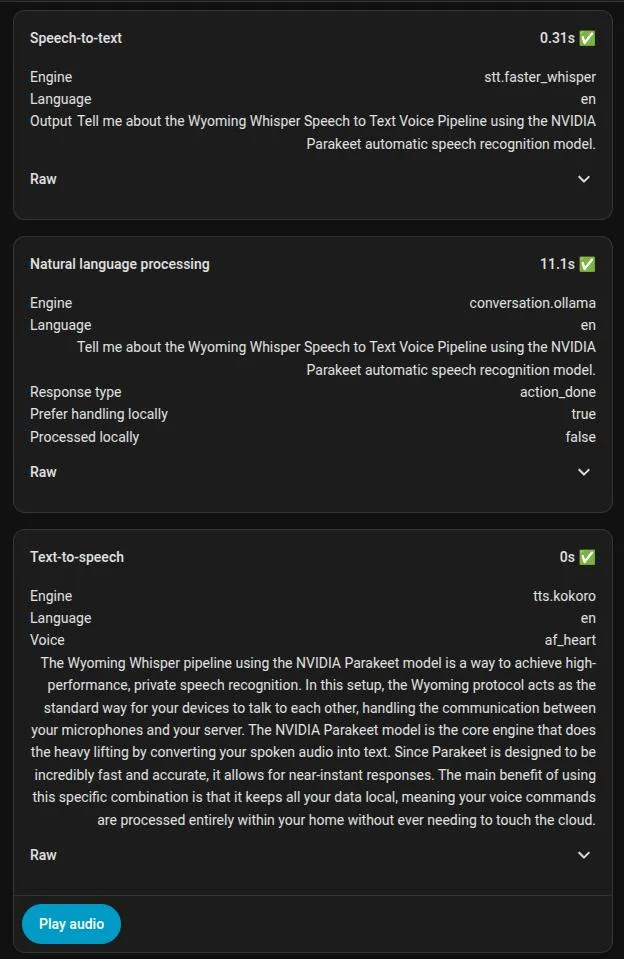
Speech-to-text finished in 0.31 seconds. Kokoro was ready to speak with no extra wait on the TTS timer. The long number in the middle is not the voice stack. That 11.1 seconds is the conversation engine thinking through a longer prompt with Ollama. Short commands like the time or a light do not look like that. The voice path did its job before the language model even started.
What This Stack Does Not Fix
Wake word detection and end-of-speech still add time. This is still not a true speech-to-speech system. Parakeet in this setup is English-first. The voice path stays on CPU, so a busy mini PC can still hitch if something else is already chewing cores. A long LLM answer can also dwarf the STT and TTS times, which is exactly what the debug panel above shows.
Those limits are worth stating up front. The win is not magic. The win is losing the dead air and the robotic voice without sending audio to the cloud.
The goal was never to copy a cloud assistant feature for feature. It was to make local voice feel usable. Speech-to-text that used to take a couple of seconds now lands in about a third of a second. The reply starts speaking instead of waiting for a full sentence to render. Home Assistant still uses the same ports, the audio never leaves the house, and the next internet outage does not take the voice interface with it. That is the whole point of running this stack at home.
Remember: We may not have anything to hide, but everything to protect.