Privacy Tool Spotlight: Firewalla Switch SE

We rarely have those Philip J. Fry "Shut up and take my money!" moments, but when Firewalla opened pre-orders for the Firewalla Switch SE beta in early summer 2026, we did exactly that. Managed switches are one of the biggest pain points for people who are not network engineers, because the terminology gets technical fast. We had been watching the community boards for a switch that works natively with Firewalla, so we jumped at the chance to join the early release list. Our unmanaged switch worked fine, but the "what ifs" were too tempting to ignore. What if a switch supported both traditional VLANs and Firewalla's VqLANs? What if it managed rules by device instead of by physical port? What if it packed PoE+ and 10Gb SFP+ uplinks into a single fanless box? Our unit arrived ready to test, and just like the rest of the ecosystem, the setup was completely seamless. Setup stays in the app you already use, and wired devices get the same rules as everything else on the network.
The Network Switch Dilemma
For most home network builders, picking a switch usually means choosing between two imperfect options:
- Unmanaged switches: Plug-and-play simplicity, but zero visibility. Devices on the same switch can talk to each other with no oversight, and you cannot put gear on a separate network lane or isolate something that looks compromised.
- Traditional managed switches: Powerful, but built for IT professionals. They make you configure port tags in separate controller software and learn enterprise jargon just to isolate a smart TV.
The Firewalla Switch SE creates a third category: app-managed smart hardware. Instead of treating the switch as a standalone box with its own interface, Firewalla extends your router’s existing rules, network segments, and device profiles directly down to the physical Ethernet port.
A few terms show up in the app, so here is the plain version. A VLAN is a separate network lane that can share the same physical cables. A VqLAN is Firewalla’s finer version of that idea: rules between individual devices, not just between whole lanes. PoE (Power over Ethernet) sends power through the same cable that carries data. SFP+ ports are the faster uplink sockets, used with the right module or cable to connect the switch to your router.
How the Switch SE Changes Everyday Network Management
- Initial setup: Traditional switches require logging into a standalone web console or hosting separate controller software. The Switch SE pairs instantly inside your existing Firewalla mobile app, with zero extra software required.
- Network segment setup: On a traditional switch, you map tags and trunk settings by hand. On the Switch SE, ports pass every VLAN by default. For a device that should stay on one segment, you set that port to Access and pick the VLAN in the app. Rules and VqLAN isolation still follow the device’s MAC address, so they apply on whichever port that device is plugged into.
- Rule enforcement: Traditional switches tie rules strictly to physical ports, so moving a cable breaks your setup. Firewalla attaches rules to the device itself, so your security policies follow the device no matter where it plugs in. The switch still enforces that policy on whichever port the device is using.
- Local traffic security: Basic switches let devices on the same local network talk freely without firewall oversight. The Switch SE brings Firewalla's VqLANs to wired ports, so you can block device-to-device chatter you do not want.
- PoE controls: Instead of digging through browser status pages to check power draw or reset a locked-up access point, you can toggle power for any individual port with a single tap on your phone.
By eliminating the separate management layer, the Switch SE removes the friction that keeps non-engineers from securing their wired networks properly.
Security That Follows the Device, Not the Socket
On a traditional managed switch, security rules live on the physical port. If you assign Port 3 to your guest network, whatever you plug into Port 3 ends up there. Move a work laptop from Port 3 to Port 5, and you have to log into a browser console and reconfigure both ports. Unplug an isolated smart TV and plug a laptop into that same cable, and the laptop instantly inherits restrictions meant for the TV.
The Firewalla Switch SE flips this for device rules. Ad blocking, parental controls, VPN routing, pause schedules, and VqLAN isolation attach to the device’s MAC address, the hardware ID it already uses on the network, not to the socket. Move a gaming console or workstation to any open Ethernet port on the Switch SE, and those policies move with it. VLAN membership is still a port setting: ports pass every VLAN by default, and you set a port to Access in the app when a device should stay on one segment.
That device-level control matters most when several devices share a switch but should not freely talk to each other. On a normal home network, two wired devices on the same switch can reach each other directly. Your router never sees that traffic. If a camera, hub, or spare PC is compromised, it can scan the desktop, NAS, or other gear sitting on the same switch.
VqLANs let you set those boundaries in the app, on the same physical switch:
- You can put three smart home hubs on the Switch SE without buying separate switches or tagging every port by hand.
- You can let a smart TV reach your media server and block it from your desktop or NAS, even if all three are in adjacent ports.
- If Firewalla flags suspicious behavior on a wired device, one tap in the app isolates that device at the switch and stops it from moving sideways through the network.
The policy follows the device. The switch applies it on the port that device is actually using.
Hardware Overview: Built for Speed, Silent by Design
This is the switch for a Firewalla network that already has, or soon will have, a Wi-Fi access point, a couple of cameras, a NAS, and a desktop, in a room where fan noise would be annoying.
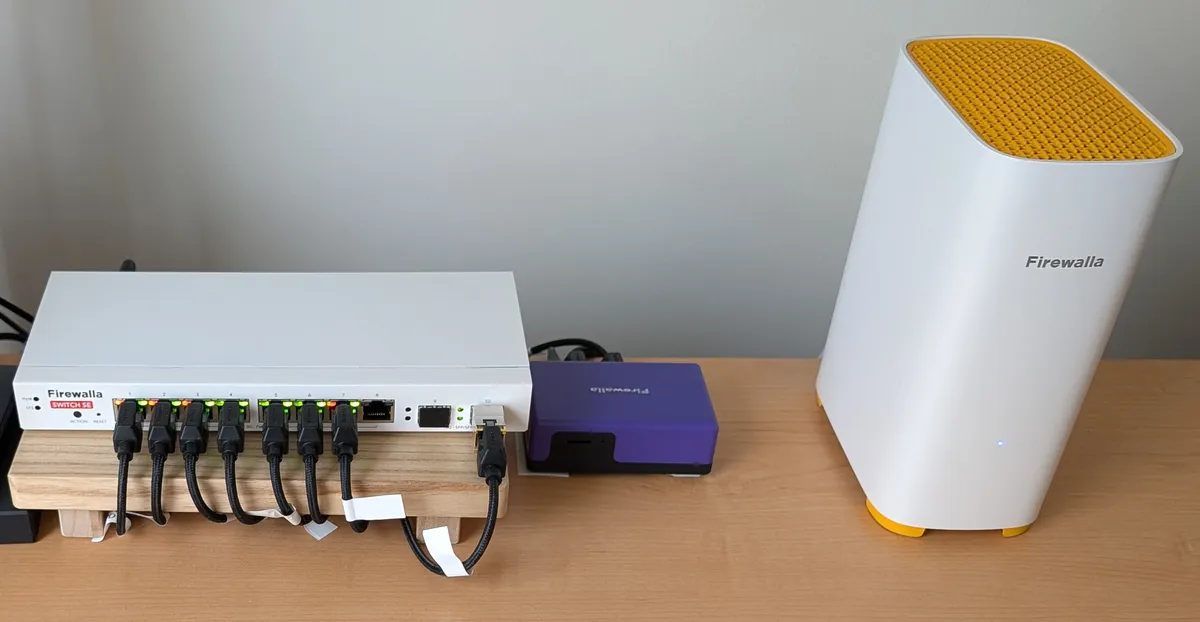
Key Hardware Specifications
- Eight 2.5 Gbps Ethernet ports: Fast enough for Wi-Fi 6E/7 access points, gaming PCs, and a NAS without forcing everything onto older 1 Gbps ports.
- Two 10 Gbps SFP+ uplinks: Dedicated links to a Firewalla Gold Plus or Gold Pro so the 2.5G ports are not choked by the connection back to the router. These need a compatible module or cable. We are using a 10Gtek 10GBase-T SFP+ to RJ-45 transceiver to connect a Firewalla AP7.
- Up to 114W of shared PoE+: Power over the Ethernet cable for cameras, IP phones, and a ceiling access point such as the Firewalla AP7. The 114W is a total budget across the ports, not 114W on each one, using the common 802.3af/at standards.
- Silent, fanless steel case: Passive cooling only. No internal fans, so it can sit on a desk or in a living space.
- 80 Gbps switching capacity: Enough backplane for local file transfers and busy wired traffic without the switch itself becoming the bottleneck.
Multi-gigabit ports, power for access points and cameras, and no fan noise, managed in the same app as the rest of the network. That is the practical case for the Switch SE.
Installation
Our Switch SE arrived about two weeks after we ordered it, and the installation was almost a non-event. We turned off the old switch, moved each cable from the old ports to the matching ports on the new switch, and powered it on. Then we opened the Firewalla app, scanned the QR code on the switch to add it, and let it finish a quick firmware update. After that, everything was up and running.
In the early beta, the switch could only be managed through the app. It is now also available in the Firewalla Managed Security Portal web interface, so you can manage it from either place.
What surprised us most was how quickly the switch recognized every device we connected. In the app you can see, for each port, the current speed, data usage, power draw on the PoE ports, and ACL (access control list) activity. You can also set any port as an access port (for a single device or network) or a trunk port (for carrying multiple networks) and assign it to a specific network if you run more than one. The interface makes these choices straightforward.
As mentioned earlier, we added a 10Gtek 10GBase-T SFP+ to RJ-45 transceiver so the AP7 access point could take advantage of the higher-speed uplink.
Overall the setup was quick and simple. We have not needed to adjust anything since the day we installed it. Like the rest of our networking gear, the switch is plugged into a UPS.
The Upgrade That Just Worked
This has been the most beneficial network upgrade we have made, and it came without any drama. That is worth saying twice because we bought it as a beta. Early hardware usually means odd bugs, surprise reboots, and a weekend spent chasing release notes. None of that showed up here. It paired in the app, took the rules we already had, and stayed quiet.
The beta is now a regular release, which matches how it behaved on our network from the start. Wired devices finally get the same treatment as everything else: policies that follow the device, isolation when we want it, and power for the access point without a second box or a fan. If the missing piece in your Firewalla setup has been the switch, this is the one that closes the gap.
Remember: We may not have anything to hide, but everything to protect.