In the Lab: Brave Temporary Containers and Traffic Control

As the saying goes, "Life is what happens when you’re busy making other plans." We were in the middle of writing a couple of other posts when Brave dropped a new beta feature yesterday and pulled us off course. Mix that with a feature that already shipped and barely got talked about, and you get a pretty nice upgrade to how Brave works day to day.
Brave added native Containers in version 1.92, which landed on July 2, 2026. We have been testing them since April 2026. They keep storage separated inside the same profile, so you can be logged into the same service with two different accounts in two different tabs. No private window. No second profile. It all stays in the same browser window.
One piece that came along with Containers, and that a lot of people skip past, is New Temporary Container. It opens a tab whose site data is meant to be thrown away. It feels a bit like a private window, but it is not the same, and it stays inside your normal browsing setup. Useful for sites that tend to leave a mess in the cache. Brave does not wipe it the moment you close the tab. A temporary container is deleted only after all of its tabs are closed and can no longer be restored, including with Ctrl+Shift+T or session restore. Until then the data sticks, even across a restart, as long as those tabs are still open or restorable.
Yesterday, Traffic Control showed up as an experiment in the latest desktop builds, at least on some setups. So far we can confirm it on Linux and Windows.
Here is the simple version. You tell Brave that a site, or a pattern of addresses, always belongs in a certain container. Set the rule once. After that, the browser does the routing for you.
Click a favorite. Open a bookmark. Type an address. Follow a link from another container. Brave catches the visit and opens it in the container you chose. You do not have to right-click the tab and pick the container by hand every time.
That is the part that made us stop and go, whoa. The containers stay separated, and the browser remembers which site goes where. You know we had to drop everything and give it a spin.
How To Test Traffic Control
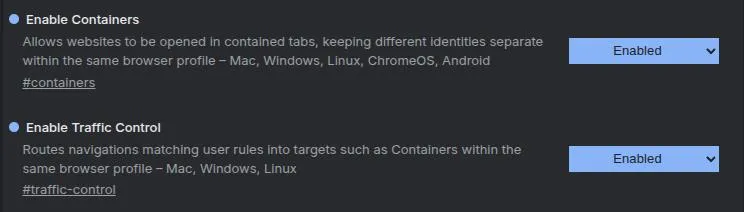
Start by updating to the latest release. As of this writing, we are on Brave 1.97.56. Containers and Traffic Control both have to be turned on under Experiments. Open brave://flags, enable both, and restart the browser. Brave usually pops that restart prompt in the lower right. After the restart, both show up in Settings (brave://settings) under the Content menu.
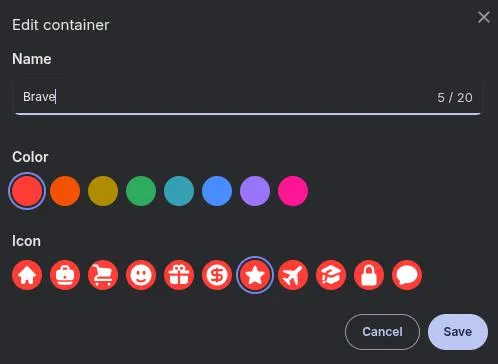
For this example, we wanted anything Brave-related to stay in its own container. In the container section, click Add new container. We named it Brave, picked a color and an icon, and hit save. Done.
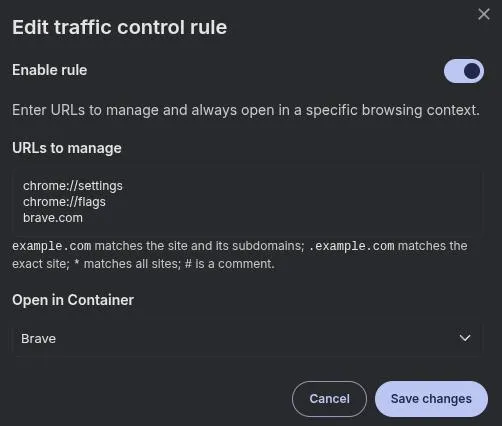
Then click Add new rule under Traffic Control. In URLs to manage, we put:
chrome://settings
chrome://flags
brave.com
That covers Brave sites and the browser's own pages. Under Open in Container, pick the Brave container and save.
After that, a visit to the settings page or to search.brave.com opens only in the Brave container. Pretty cool, right?
And yes, those chrome entries look odd in a Brave rule. What we saw is that brave://settings gets rewritten as chrome://settings under the covers, so that is the pattern you need if you want the browser's own pages caught by the rule.
How We're Testing These Features
If the '80s taught us anything, it is that nothing succeeds like excess. But seriously, we wanted to push these features a bit. We cleared the current profile on the test machine and started from scratch. You could also make a new Brave profile for this. Each profile keeps its own settings, right down to the extensions.
The idea was a least-privilege setup. We made a container for each site we stay logged into, so those accounts stay split from everything else. Then we added one last rule: anything we had not already named opens in a new temporary container. It sounds like a lot of busywork. The test setup took about 20 minutes.
Now the sites we use every day open only in their own container. Everything else lands in a temporary container. That data goes away only after those tabs are closed and can no longer be restored. Closing the browser is not enough if the tabs come back.
Is that the best way to use this? Does it change much in practice? Honestly, we do not know yet. That is why we are testing it, and we fully expect things to break. That is how we figure out what it actually does.
Existing Brave Protections
We have already been asked if this makes privacy much better in a browser that is already built around privacy. Not by much, if at all. Again, that is why we test.
Brave already isolates storage before you ever turn on Containers. That built-in behavior is what stops most cross-site tracking. Containers sit on top of it as a way to keep your own logins apart. Think labeled folders for your own tabs, not a new privacy shield.
Two layers are doing the real work here.
Ephemeral third-party storage. When a page loads, it often pulls in helpers from other companies. An ad network, an analytics script, a social widget. Those helpers used to drop a cookie or a localStorage note that they could read again on the next site. That is how a browsing history gets stitched together.
Brave does not give that helper one shared box. It gives the helper a separate box for each site it appears on. The note left while you are on a shoe store cannot be read from a news site, even if the same company is embedded on both. Leave the site, and Brave throws that third-party box away. First-party storage for the site itself can still stick around, which is why you stay logged in.
Network-state partitioning. Trackers also tried side doors that are not cookies. A shared cache, a reused network connection, font and favicon caches, service workers, TLS session IDs. Brave partitions those too, keyed to the site you are actually visiting, so a tracker cannot use them as a back channel between sites.
Shields still block a lot of those requests outright. Partitioning is the fallback for the ones that have to run so the page does not break.
Containers are a different cut. They isolate website-visible state for you: cookies, localStorage, caches, service workers, TLS session IDs. That is why two tabs can be logged into the same site as two different accounts. Extensions, passwords, history, autofill, and Shields settings stay shared across containers in the same profile.
Add Aggressive blocking and your choice of block lists, and Brave already does a solid job of stopping the tracking that is common in other browsers. That sits on top of the blocking happening at the network level.
None of that is fingerprinting protection. Fingerprinting is a site asking the browser about the device (screen size, graphics, fonts, time zone) and combining the answers into an identifier, with no cookie required. Brave does two things about it. It blocks or blanks some of those APIs so browsers look more alike, and it farbles others. Farbling slightly changes the answer using a seed that is per session, per site, and per storage area. The same site gets the same answer for that session, so the page does not break. A different site gets a different answer, and a restart gets a new one. It also blocks known fingerprinting services. The arms race with trackers is not over.
Wrap Up
We think these two features have a lot of potential, and we wanted to share how to turn them on and try them.
Containers are the part we already liked. Two accounts, one window, no second profile. Temporary containers are the handy extra for sites you do not want hanging around, once those tabs are closed and can no longer be restored. Traffic Control is what makes that setup practical. Set the rule once, and Brave sends the site where it belongs.
For us, the test is working if the named containers still hold their logins, unnamed sites do not remember us after their tabs are gone for good, and the first thing that breaks is a login that hops across domains. We will write that up if it does.
Anything marked experimental can still do something nasty. If you try it, use a test profile, and do not be surprised if a rule needs a tweak.
Remember: We may not have anything to hide, but everything to protect.